Identity Shield: How Server-Side Schema Injection Works
Most businesses that have structured data on their website got it one of two ways: a developer hard-coded it during the site build, or a plugin generates it from CMS fields. Both approaches work. Neither scales well, and both introduce a maintenance problem that quietly erodes AI visibility over time.
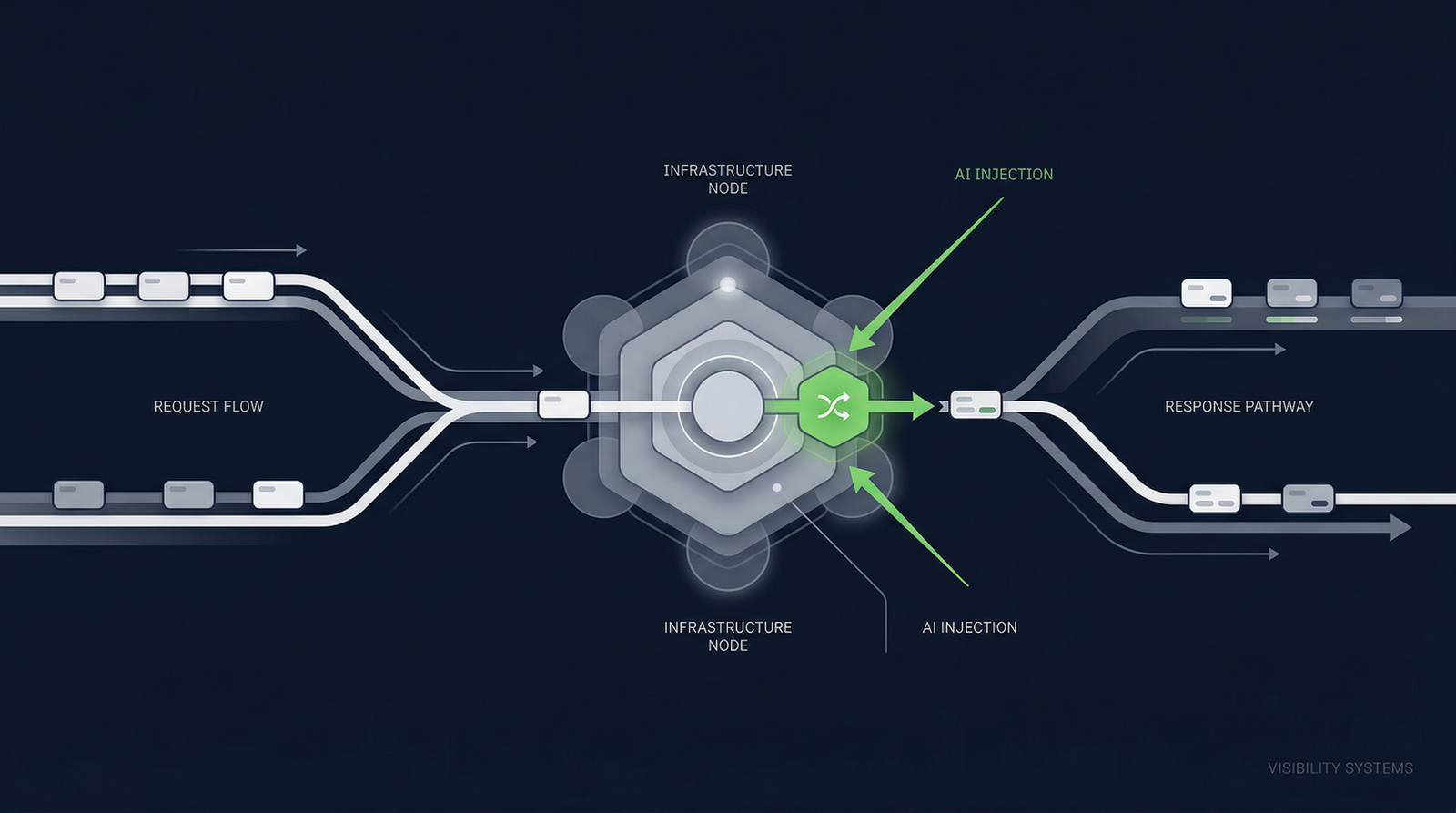
Identity Shield takes a different approach. It delivers structured data at the infrastructure level — injecting your canonical JSON-LD into every page response before it reaches the browser, the search engine crawler, or the AI system.
The problem with existing approaches
Hard-coded JSON-LD is the most common implementation. A developer writes structured data into your page templates during the build process. The data is static — baked into your theme files or HTML templates. It works reliably, but updating it requires a developer, a code deployment, and a release cycle. For most businesses, this means structured data gets set once and never updated.
Plugin-generated JSON-LD is more dynamic. WordPress plugins like Yoast or RankMath generate structured data from your CMS fields. The quality depends entirely on which fields the plugin maps and how it interprets them. Most plugins generate generic WebPage schema rather than comprehensive Organization declarations.
Tag manager injection is the most fragile. Google Tag Manager or similar tools inject JSON-LD via client-side JavaScript after the page loads. This works for human browsers that execute JavaScript, but many AI crawlers parse only the raw HTML response. If your structured data depends on JavaScript execution, a significant portion of machine consumers never see it.
All three approaches share a structural limitation: the structured data is coupled to your website's technology stack. If you change your CMS, redesign your site, or migrate hosting providers, your structured data implementation breaks or must be rebuilt.
How Identity Shield works
Identity Shield decouples structured data delivery from your website's technology stack entirely. It operates as an infrastructure layer that sits between your web server and the consumers of your pages.
Management (Portal)
You configure your Identity Anchor, clarifications, and page-specific rules through the AI Search Central portal. This configuration is stored as a schema manifest.
Storage (Cloudflare KV)
Your schema manifest is published to Cloudflare's global key-value store, replicated across 300+ edge locations worldwide.
Delivery (Worker / Plugin)
A lightweight script on your infrastructure intercepts page responses and injects the JSON-LD into the HTML before delivery.
The key architectural decision is that the injection point is on your infrastructure, not ours. The Cloudflare Worker runs on your Cloudflare zone. The WordPress plugin runs on your WordPress installation. The structured data appears in the HTML response as if it were native to your site — because, at the point of delivery, it is.
The Cloudflare path
For sites using Cloudflare DNS, Identity Shield deploys as a Cloudflare Worker on your zone. The setup process uses OAuth 2.0 — when you connect your Cloudflare account through the portal, we deploy a Worker script and configure a route that triggers it on every page request.
When a page is requested, the Worker intercepts the origin server's HTML response, fetches your schema manifest from Cloudflare KV (sub-millisecond at the edge), uses HTMLRewriter to inject the JSON-LD into the page's head section, and delivers the modified response. The entire process adds negligible latency — typically under 5 milliseconds.
The WordPress path
For WordPress sites, Identity Shield is a native plugin that hooks into WordPress's wp_head action. You install the plugin, enter your subscription key, and the plugin fetches your schema manifest from the API. The manifest is cached locally using WordPress transients to minimise external API calls. On each page load, the plugin injects the JSON-LD into the HTML head section — the same mechanism WordPress itself uses for meta tags and stylesheets.
Fail-open by design
If the AI Search Central API is unreachable, if Cloudflare KV returns an error, or if the schema manifest is temporarily unavailable, Identity Shield does nothing. The page renders exactly as it would without Identity Shield installed. No error pages, no broken layouts, no degraded performance.
This is a deliberate safety constraint. Identity Shield is an enhancement layer, not a dependency. If it fails, the worst outcome is that your page is served without the managed structured data — the same state it was in before installation.
Verification and monitoring
After deployment, AI Search Central verifies that Identity Shield is operating correctly by crawling your website and confirming that the injected JSON-LD is present in the HTML response. Verification checks for a specific marker that the Worker or plugin inserts alongside the JSON-LD, confirming not just that structured data exists, but that it was delivered by Identity Shield specifically.
Ongoing monitoring is automatic. Each rescan of your website — weekly for Essentials, daily for Pro — includes verification of Identity Shield's operation as part of the standard audit pipeline.
What this means in practice
For the business owner, Identity Shield means three things.
First, you manage your structured data through a portal interface, not through code. Update your business description, add a clarification, change your logo URL — the schema manifest is republished automatically.
Second, your structured data survives technology changes. Redesign your website, migrate to a new CMS, change hosting providers — as long as the Worker or plugin remains active, your structured data continues to be delivered unchanged.
Third, your structured data is consistent. Every page on your site receives the same canonical identity declaration. There's no risk of one template having different schema than another, or a new page being published without any structured data at all.